Finance
The Finance menu holds every bill and every rupee: what a patient is charged, how they pay, what they still owe, what the insurer settles, and what goes to the accountant.
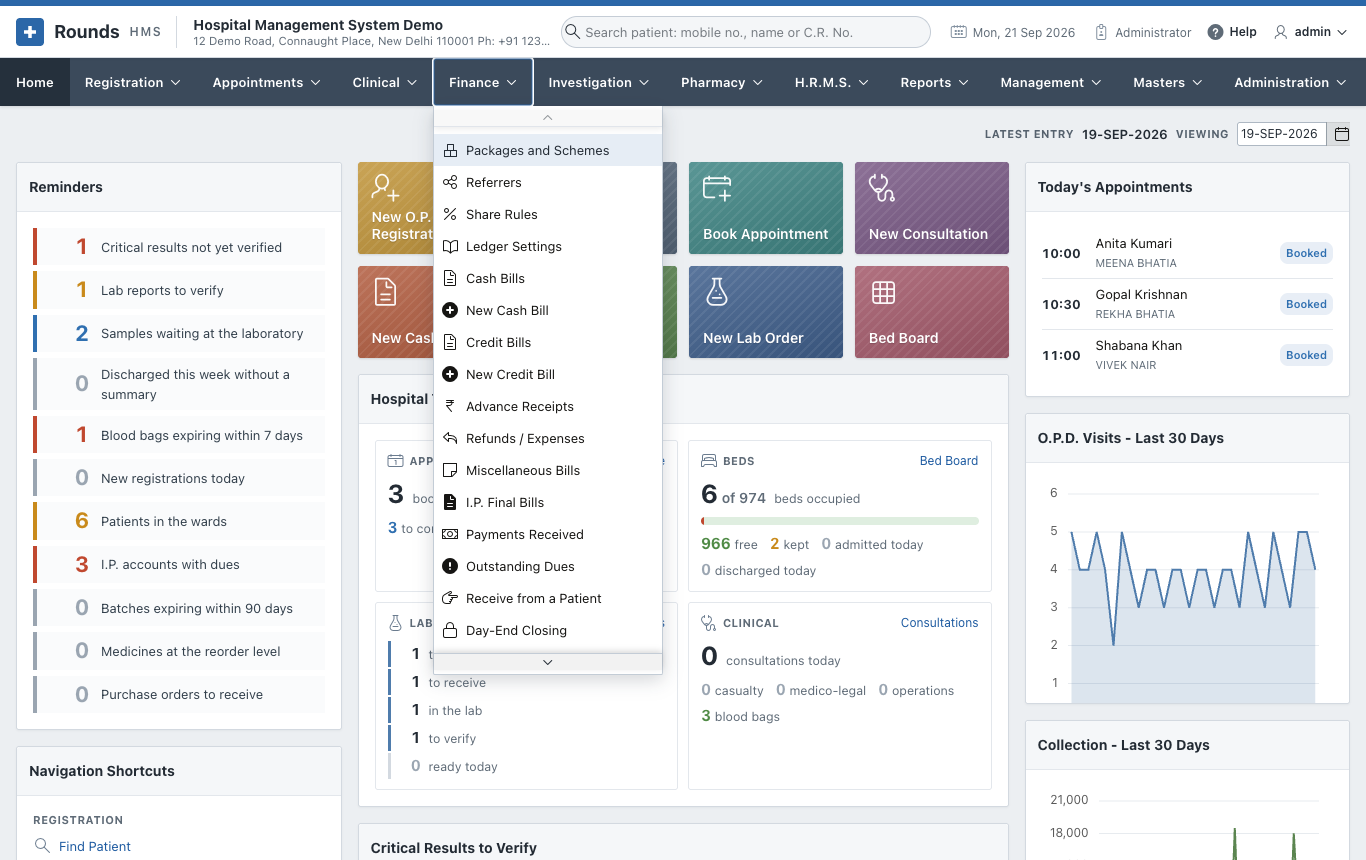
| Page | Options |
|---|---|
| Bills | Cash Bills / New Cash Bill, Credit Bills / New Credit Bill, Miscellaneous Bills, Refunds / Expenses |
| In-Patient Billing and Dues | Advance Receipts, I.P. Final Bills, Payments Received, Outstanding Dues, Receive from a Patient |
| The End of the Day | Day-End Closing, Day-End Closings, Collections by Mode, Receivables Ageing |
| Insurance and Packages | Insurance Claims (with their papers), Items Insurers Do Not Pay, Packages and Schemes |
| Doctor and Referral Shares | Referrers, Share Rules, Doctor and Referral Shares, Share Payouts |
| Rates and Discounts | Tariff Versions, Discount Approvals |
| GST and the Accounts | GST Returns, E-Invoices, Ledger Settings, Day Book, Ledger, Accounting Export |
How a payment is recorded
Every screen that takes money (a registration, a bill, an advance, a receipt) or gives it back (a refund) has the same payment fields:
| Field | Meaning |
|---|---|
| Paid By | cash, UPI / QR code, debit or credit card, wallet, payment link, bank transfer (NEFT / IMPS / RTGS) or cheque |
| Transaction ID / Ref. No. | for anything other than cash: the UPI reference, card approval code, UTR or cheque number |
| UPI QR Code | with UPI, a QR code of the exact amount; the patient scans it with any UPI app |
| Paid in Two Ways | Yes splits the payment, e.g. part UPI and the rest cash, with Rest Paid By and Amount by the Second Mode |
The way each document was paid is printed on it ("Paid by: UPI 500.00 (Ref ...), Cash 100.00"). The day-end closing counts it by mode, and the accounts post it to the right ledger.
Set up once
- The UPI ID for the QR codes: Administration > Hospital Details.
- The ledgers of each mode for the accountant: Ledger Settings.