Payroll
Payroll works a month out from two things: what each person's salary is made of, and what their attendance and leave say. You look at the result, correct what is wrong and work it out again as often as needed. Only then is the month locked. A locked month is final: its payslips can be printed, and it reaches the accounts.
Three screens are used, all for administrators:
| Screen | Used |
|---|---|
| Salary Structure | when someone joins, gets a rise, or has something to recover |
| Run Payroll | once a month |
| Payslip | from Run Payroll, for each person |
Before the first month, check Salary Heads and Payroll Settings.
Salary Structure
H.R.M.S. > Salary Structure is one person's salary, head by head.
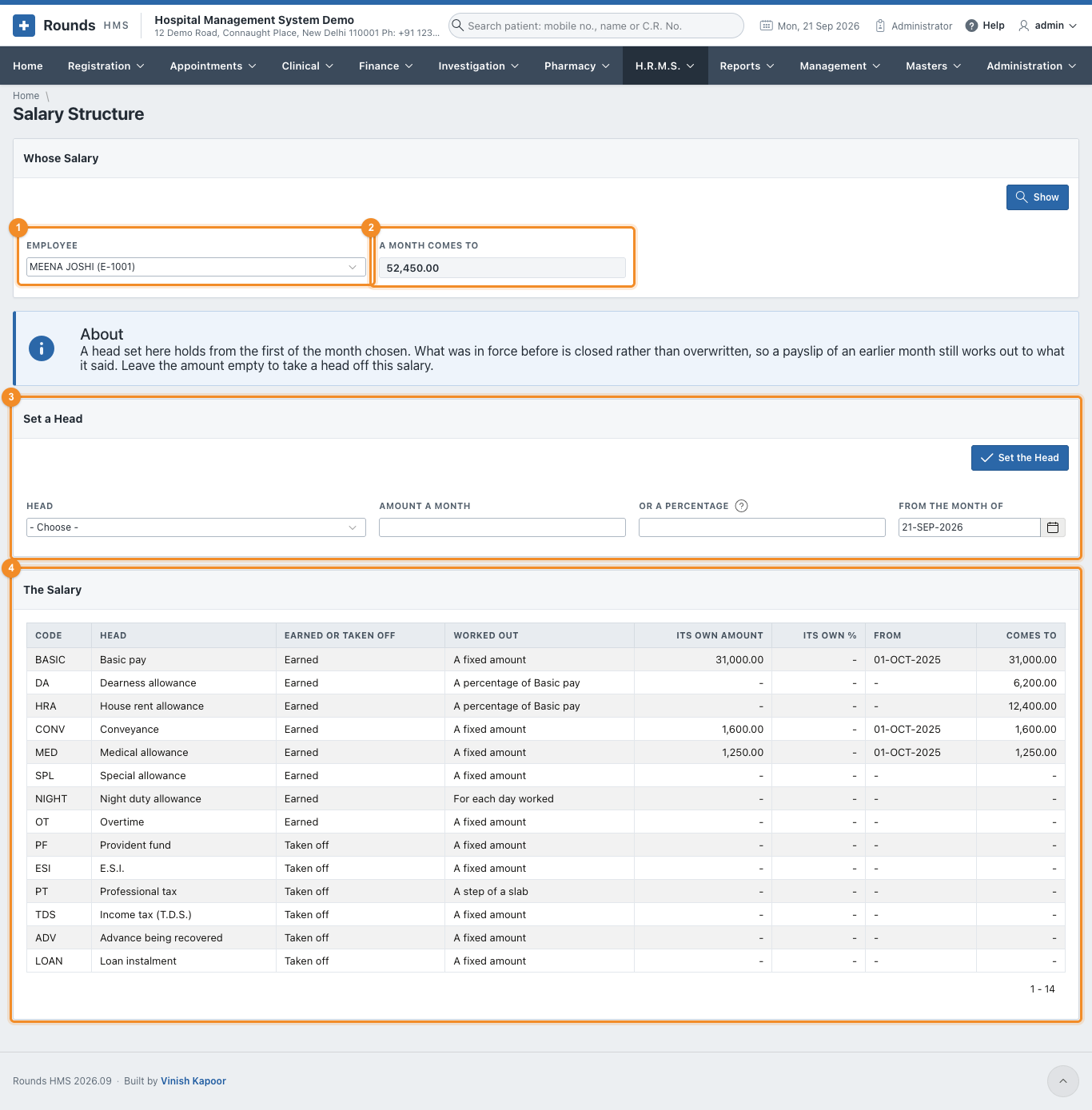
- 1 Employee. Click Show.
- 2 A Month Comes To: the gross of a full month, as the salary stands today.
- 3 Set a Head (below).
- 4 The Salary: every head, how it is worked out, the person's own amount and the date it holds from, and what it comes to each month.
A head worked out as a percentage needs nothing here: in the example, D.A. and H.R.A. follow basic pay by themselves.
Set a head
- Choose the Head, e.g. Basic pay.
- Amount a Month, or Or a Percentage for a head worked out as a percentage.
- From the Month of: the first month the new amount is paid.
- Set the Head.
What was in force before is closed, not overwritten. A payslip of an earlier month still works out to what it said. To take a head off a salary, set it with the amount left empty.
Use the same screen for T.D.S.: set Income tax (T.D.S.) to the amount to deduct each month. For an advance or a loan, set Advance being recovered or Loan instalment to the monthly instalment. Take it off again once it is recovered.
Run Payroll
H.R.M.S. > Run Payroll is one month.
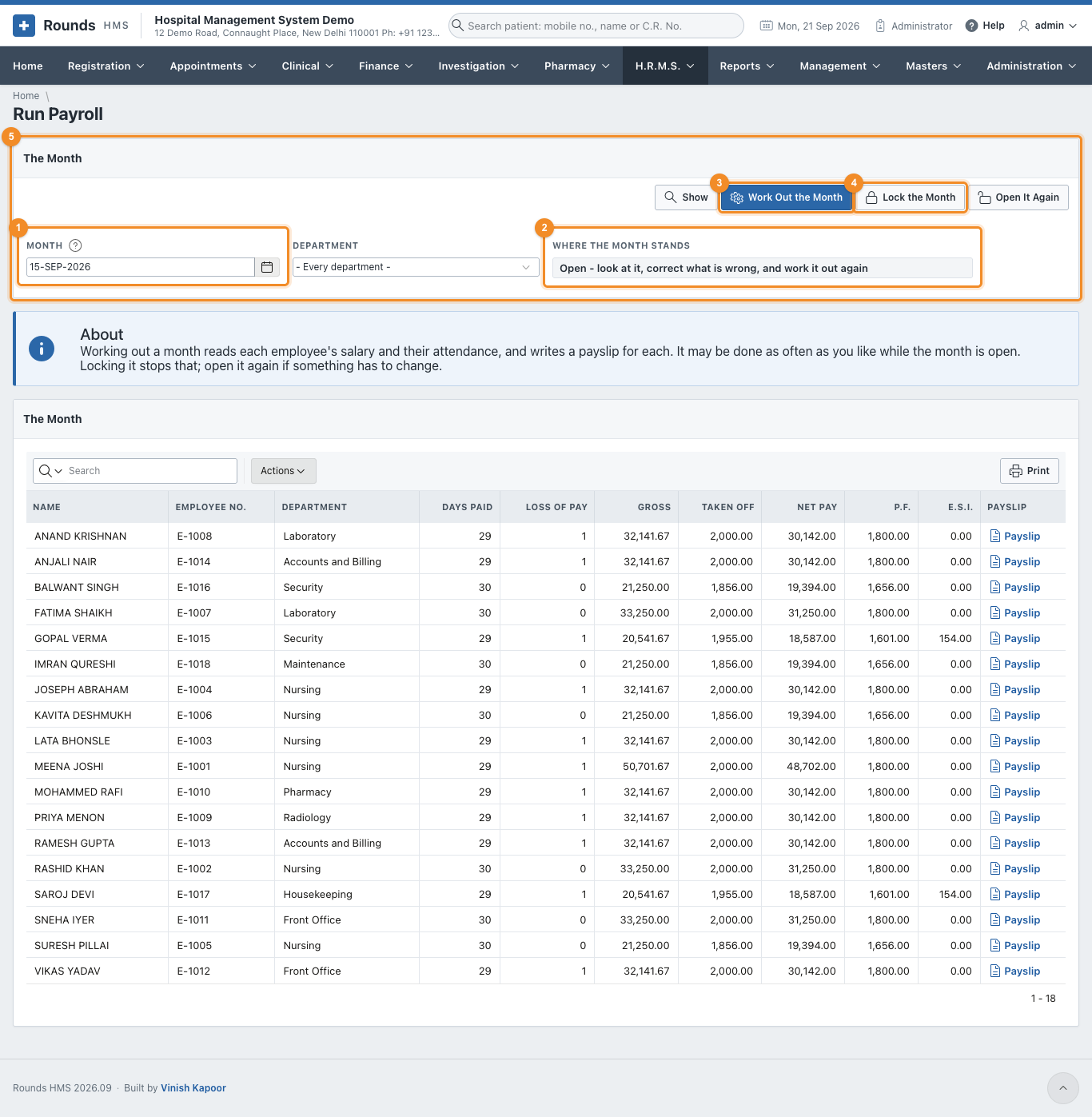
- 1 Month: any day of the month. Department narrows it (every department by default).
- 2 Where the Month Stands: not worked out yet, open, or locked (and whether it is paid).
- 3 Work Out the Month writes a payslip for everyone paid by payroll who has a salary. Run it again after any correction: everything is worked out afresh.
- 4 Lock the Month, when the figures are right.
- 5 The Month: one row per person, with the days paid, the loss of pay, the gross, what is taken off, the net pay, P.F. and E.S.I., and a link to the Payslip.
How a month is worked out
| Days paid | the days of the month (or thirty, as the settings say), less the loss of pay |
| Loss of pay | days absent (if the settings say an absent day is loss of pay) and days of unpaid leave. Someone who joined or left during the month is paid only for the days they were here |
| Nothing marked | if no attendance is kept for someone, the whole month is paid |
| Each earning | its amount for a full month, times the days paid, divided by the days of the month (unless the head is paid in full). A head for each day worked is its amount times the days present |
| Overtime | the overtime minutes of the month at the rate of the settings |
| P.F. | the employee's share of the wages that count towards P.F., up to the ceiling. The hospital's share is worked out the same way |
| E.S.I. | only for someone whose E.S.I. wage is within the limit: the employee's and the hospital's shares |
| Professional tax | the step of the slab the gross falls in |
| Net pay | the gross less everything taken off, rounded as the settings say |
The hospital's own share of P.F. and E.S.I. is not taken off the salary. It is shown under the payslip and in the Statutory Returns, and it goes to the accounts as an expense.
Locking, and opening again
Lock the Month makes the figures final. A locked month cannot be worked out again: Work Out the Month refuses until Open It Again is clicked. Open a month only to correct a mistake, then lock it again.
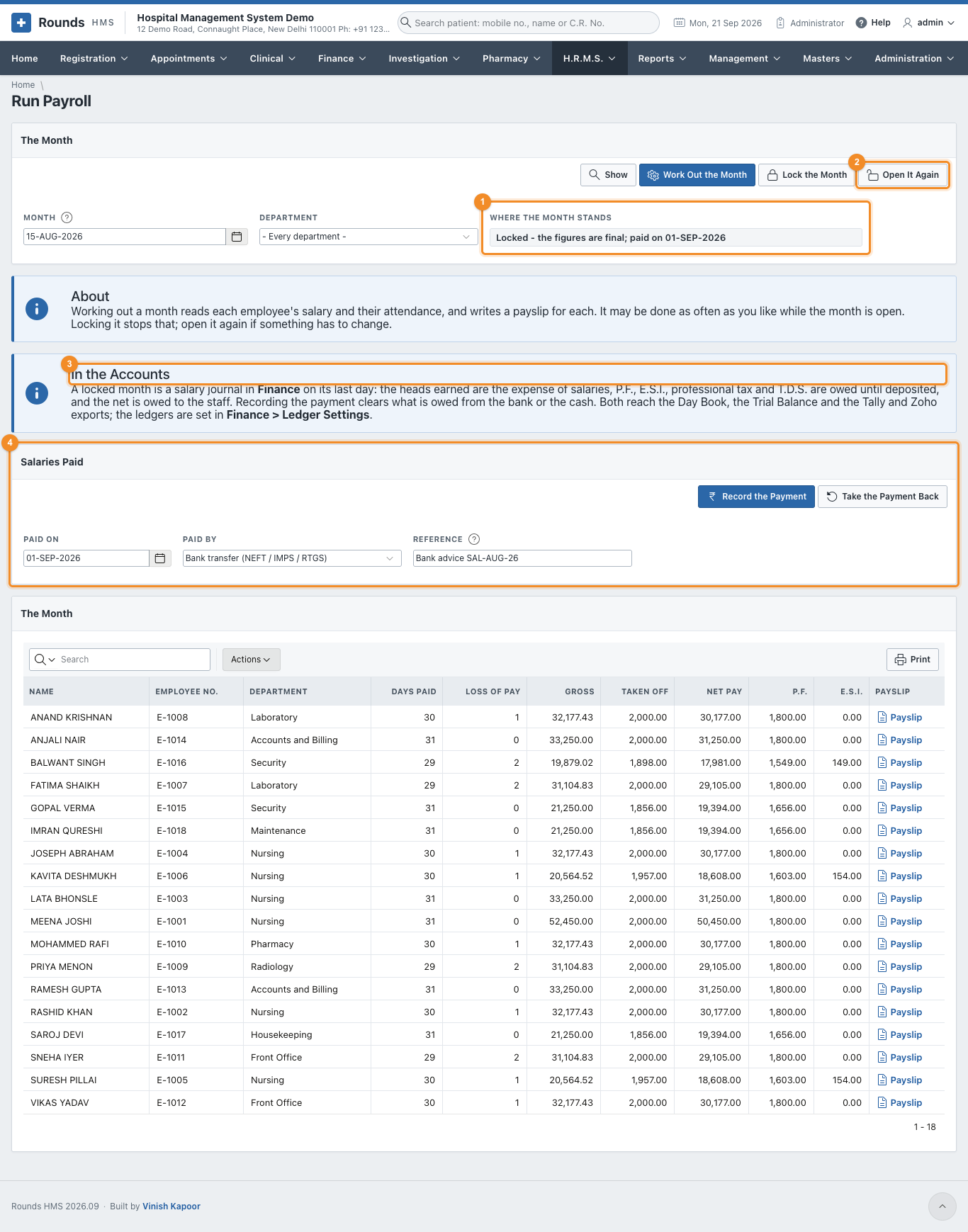
- 1 Where the Month Stands: Locked - the figures are final; paid on 01-SEP-2026.
- 2 Open It Again is refused once the salaries are recorded as paid: take the payment back first.
- 3 In the Accounts explains what the month has written in Finance.
- 4 Salaries Paid (below).
Salaries paid
Once the bank has paid the salaries (or they were paid in cash), record it:

- 1 Paid On: the day the money went out.
- 2 Paid By: the mode of payment, e.g. Bank transfer (NEFT / IMPS / RTGS). It decides the bank or cash ledger the payment comes from.
- 3 Reference: the bank advice or cheque number.
- 4 Record the Payment.
- 5 Take the Payment Back undoes it, e.g. if it was recorded against the wrong month.
The list to hand the bank is the Bank Payment Statement.
The payslip
Payslip on a row of Run Payroll opens that person's payslip. Print prints it on one page.
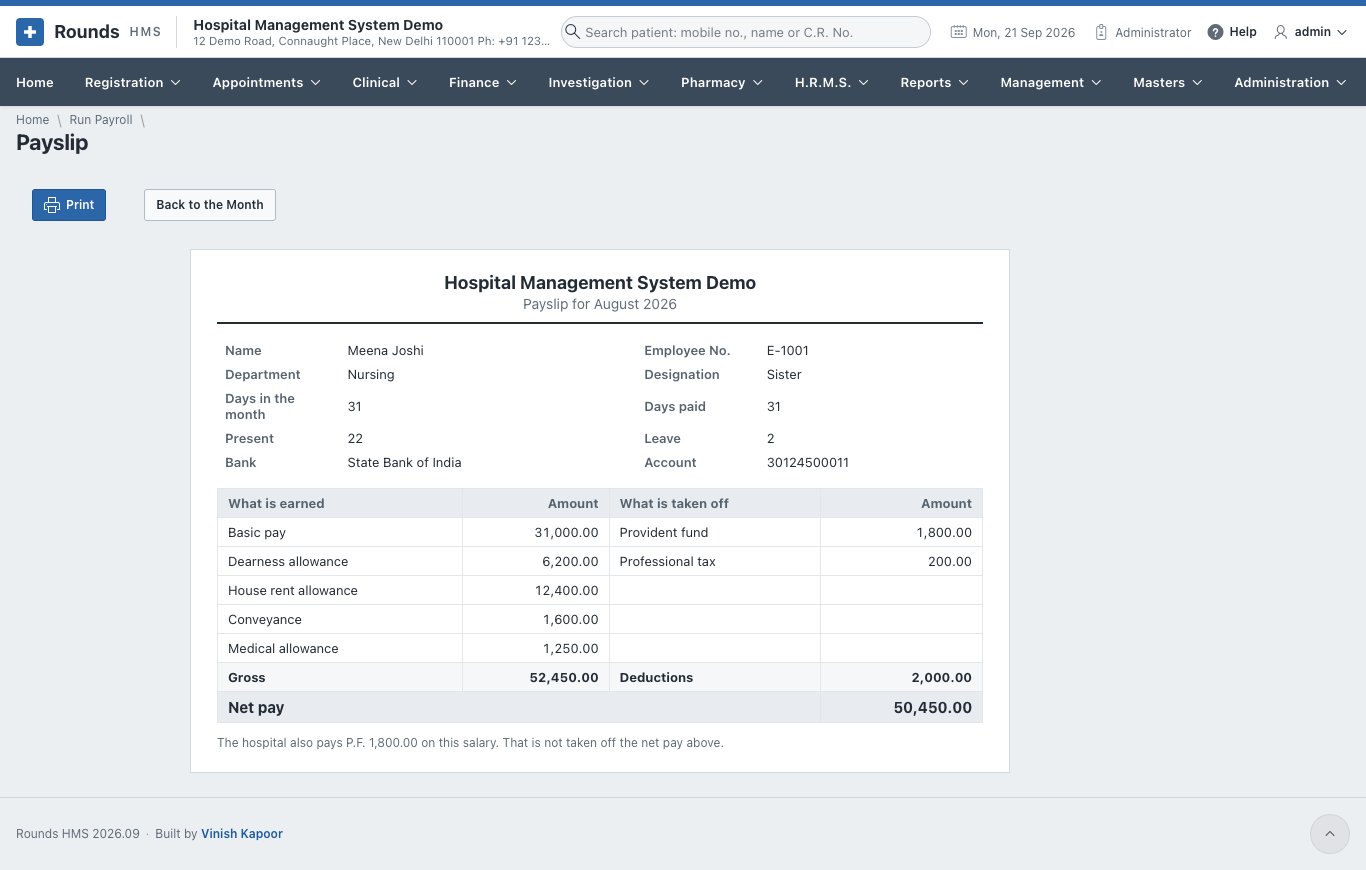
It shows the days (of the month, paid, present, on leave), the bank account, every head earned and every head taken off, the gross, the deductions and the net pay. Heads that come to nought are not shown. Under it, the hospital's own share of P.F. and E.S.I., which is not taken off the net pay.
Salaries in the accounts
A locked month becomes a salary journal in Finance, dated the last day of the month. Recording the payment adds a payment voucher on the day it was paid. Both appear in the Day Book, the ledgers, the Trial Balance and the Tally and Zoho exports, with nothing to type in.
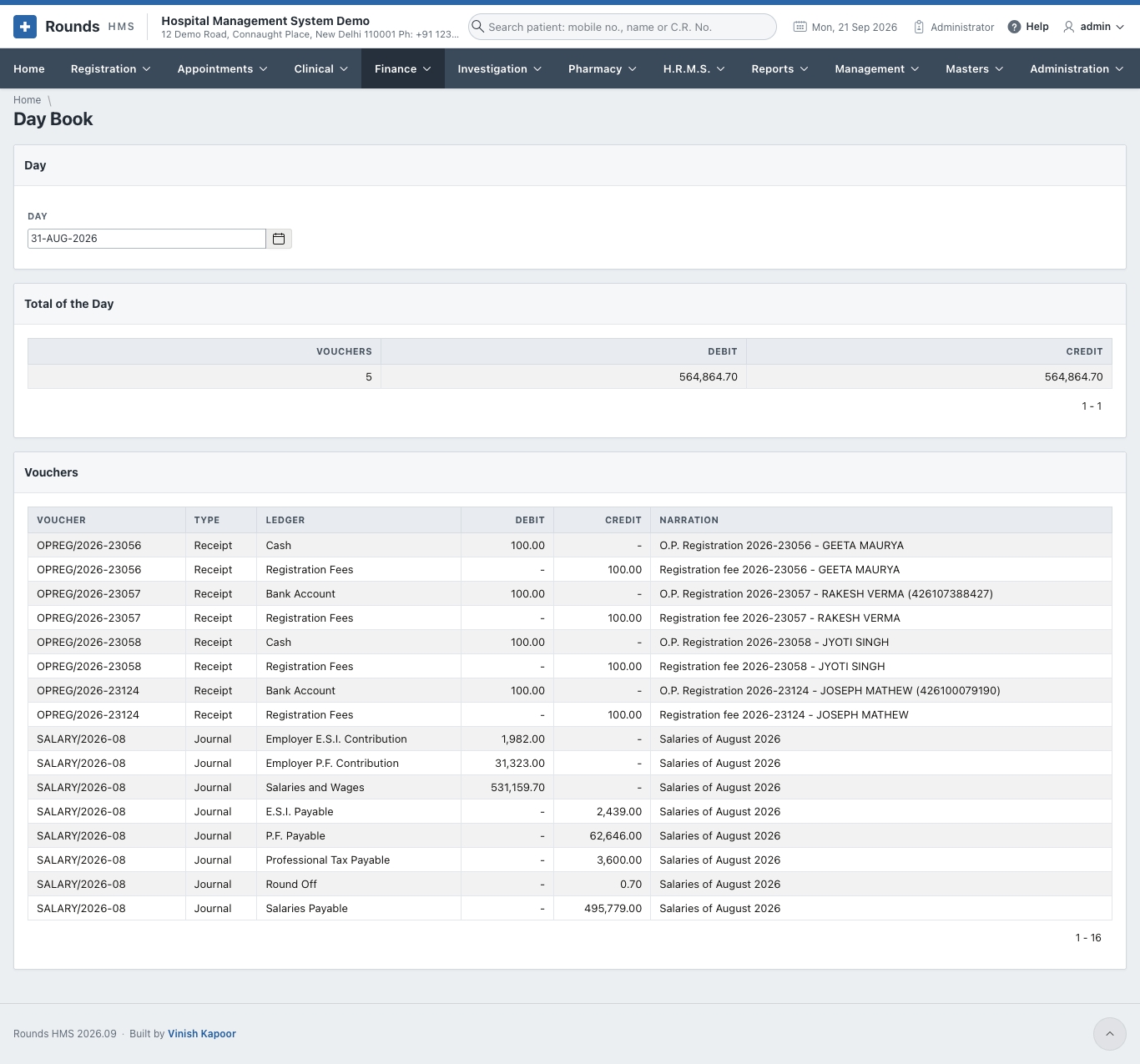
| Line | Debit or credit | Ledger (as supplied) |
|---|---|---|
| Every head earned (basic, D.A., H.R.A., allowances, overtime) | debit | Salaries and Wages |
| The hospital's share of P.F. and of E.S.I. | debit | Employer P.F. Contribution, Employer E.S.I. Contribution |
| P.F., both shares | credit | P.F. Payable |
| E.S.I., both shares | credit | E.S.I. Payable |
| Professional tax, T.D.S. | credit | Professional Tax Payable, T.D.S. on Salaries |
| Advances and loans recovered | credit | Staff Advances, Staff Loans |
| The net pay | credit | Salaries Payable |
| The rounding of the net pay | debit or credit | Round Off |
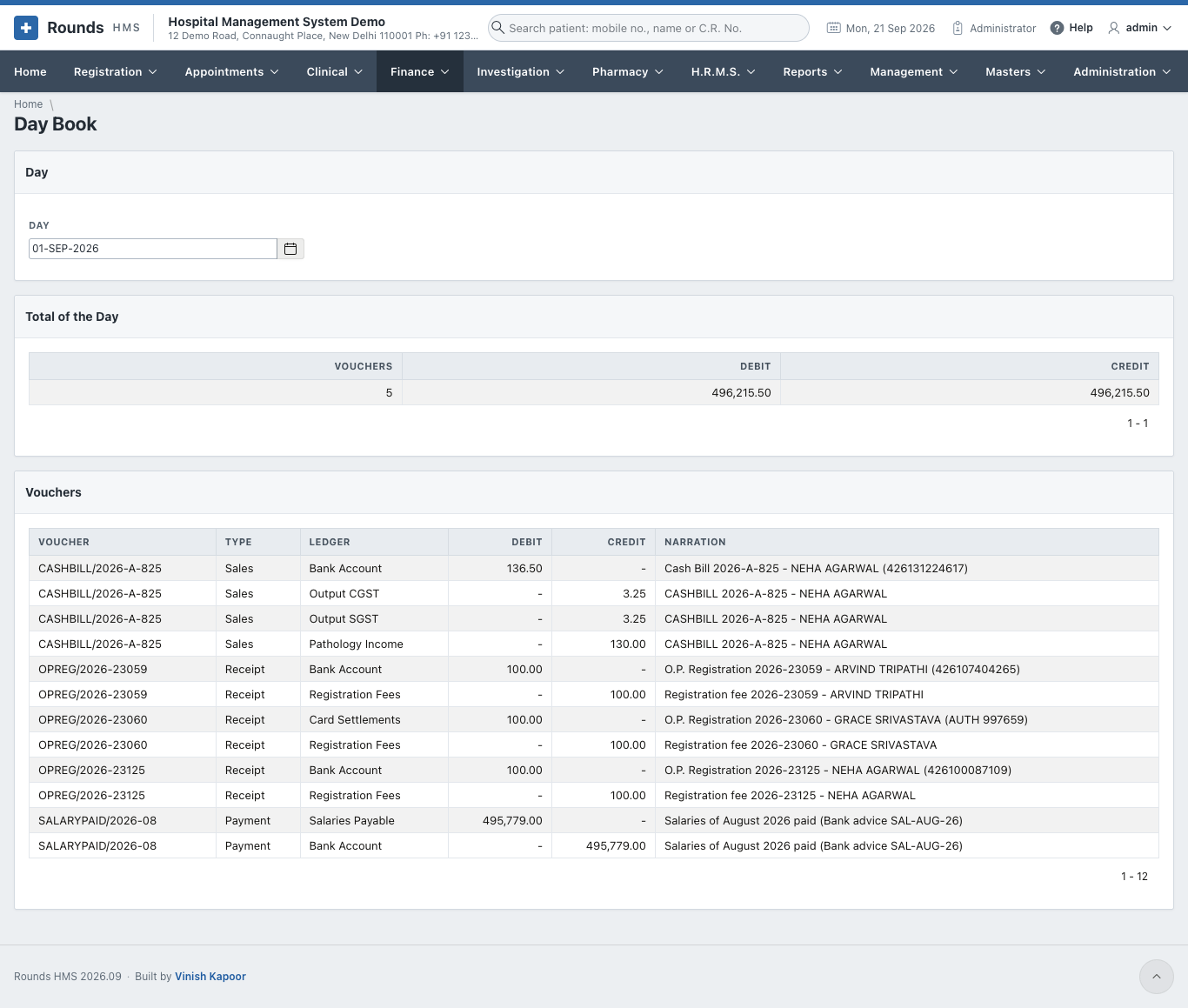
The payment voucher then debits Salaries Payable and credits the bank (or cash) of the mode it was paid by, so Salaries Payable comes back to nought.
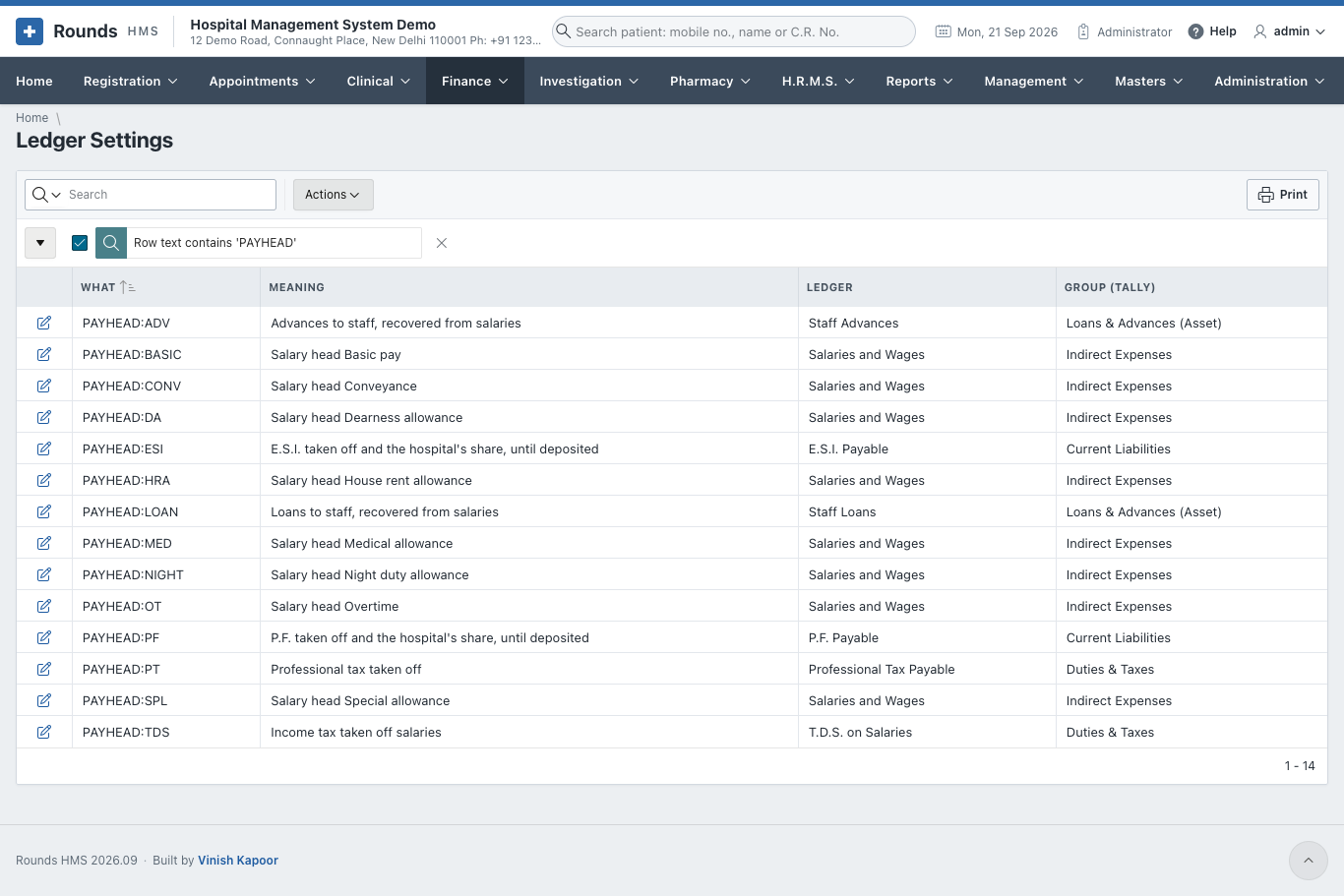
Every salary head has its own line in Finance > Ledger Settings (PAYHEAD:BASIC, PAYHEAD:HRA ...), so the ledgers can be renamed to match Tally or Zoho Books. For example, basic pay and allowances can go to separate ledgers. A head added later gets a ledger of its own kind by itself.
Opening a locked month takes its journal out of the accounts
The journal belongs to the locked month. Opening the month again takes it out until the month is locked again, so a month already sent to Tally should not be opened without telling the accountant.
A month, step by step
- Check the month's attendance and that all leave has been decided.
- Run Payroll: choose the month, Work Out the Month.
- Open a few payslips and read the list. Correct what is wrong (attendance, leave, a salary) and Work Out the Month again.
- Lock the Month.
- Download the Bank Payment Statement and send it to the bank.
- When the bank has paid, Record the Payment.
- Print the payslips, and hand the Statutory Returns figures to whoever files the P.F. and E.S.I. returns.